Running Firefox in Docker? Yes, with a GUI and noVNC

Docker isn’t just for serve your code, appliactions. you can actually run a full desktop app inside it. In this project, I containerized Firefox with a virtual desktop and made it accessible through a browser using noVNC.
What this project does?
Section titled “What this project does?”It creates a lightweight container that:
Runs a minimal desktop environment (
Fluxbox)Launches Firefox
Serves a VNC display using
x11vncExposes that desktop through
noVNC(so you can open it in your web browser)
You can literally open Firefox running inside Docker, from your browser tab. All using a single docker compose up.
How it works?
Section titled “How it works?”Here’s a quick breakdown of what happens inside the container:
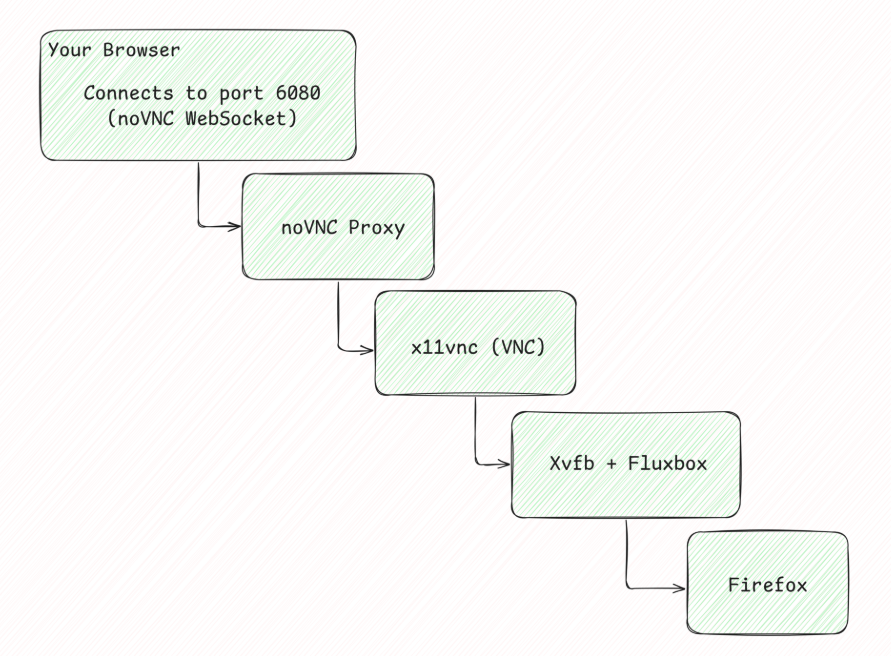
Everything runs headlessly, there’s no physical display, but the combo of Xvfb + Fluxbox gives Firefox a virtual desktop.
🐋 Dockerfile Overview
Section titled “🐋 Dockerfile Overview”FROM alpine:edge
RUN apk add --no-cache \ faenza-icon-theme \ firefox \ fluxbox \ xfce4 \ xvfb \ x11vnc \ novnc \ supervisor \ bash \ net-tools
# Install noVNC & websockify from source codeRUN apk add --no-cache git python3 py3-pip \ && rm -rf /usr/share/novnc \ && git clone https://github.com/novnc/noVNC.git /usr/share/novnc \ && git clone https://github.com/novnc/websockify.git /usr/share/novnc/utils/websockify \ && ln -sf /usr/share/novnc/vnc.html /usr/share/novnc/index.html
ENV DISPLAY=:1ENV RESOLUTION=1920x1080x24
# Set vnc passwordARG VNC_PASS=dummypass
# Create vnc password fileRUN mkdir -p /root/.vnc && \ x11vnc -storepasswd "$VNC_PASS" /root/.vnc/passwd
COPY supervisord.conf /etc/supervisord.conf
EXPOSE 5900 6080
CMD ["supervisord", "-c", "/etc/supervisord.conf", "-n"]📦 Docker Compose Setup
Section titled “📦 Docker Compose Setup”version: '3.8'services: vnc_firefox: build: . container_name: vnc_firefox ports: - "5901:5900" # VNC - "6080:6080" # noVNC web UI healthcheck: test: ["CMD-SHELL", "netstat -tln | grep -q 6080 || exit 1"] interval: 1m30s timeout: 30s retries: 5 start_period: 30s🔧 Under the Hood (process supervision)
Section titled “🔧 Under the Hood (process supervision)”
Everything is managed by supervisord, which runs:
Xvfb- virtual framebuffer displayx11vnc- provides VNC accessfluxbox- lightweight window manager (WM)firefox- your GUI browsernovnc_proxy- web socket bridge
Example supervisord.conf:
# Supervisor main config[supervisord]nodaemon=truelogfile=/var/log/supervisord.logpidfile=/var/run/supervisord.pidchildlogdir=/var/log
# XVirtual Framebuffer (Xvfb)# Creates a virtual display environment (:1)[program:xvfb]command=/usr/bin/Xvfb :1 -screen 0 1920x1080x24autostart=trueautorestart=truepriority=10
# x11vnc, VNC server[program:x11vnc]command=/usr/bin/x11vnc -display :1 -rfbauth /root/.vnc/passwd -forever -shared -rfbport 5900autostart=trueautorestart=truepriority=20
# fluxbox, lightweight window manager[program:fluxbox]command=/usr/bin/fluxboxenvironment=DISPLAY=":1"autostart=trueautorestart=truepriority=30
# Runs firefox inside the Xvfb + Fluxbox environment[program:firefox]command=/usr/bin/firefoxenvironment=DISPLAY=":1"autostart=trueautorestart=truepriority=40
# noVNC, WebSocket VNC Proxy# Bridges VNC (port 5900) to a web interface (port 6080)[program:novnc]command=/usr/share/novnc/utils/novnc_proxy --vnc localhost:5900 --listen 6080autostart=trueautorestart=truepriority=50
Our project structure should look likes this:
.├── docker-compose.yml├── Dockerfile└── supervisord.confHow to Run It?
Section titled “How to Run It?”1. Build & start the container:
$ docker compose up --build -d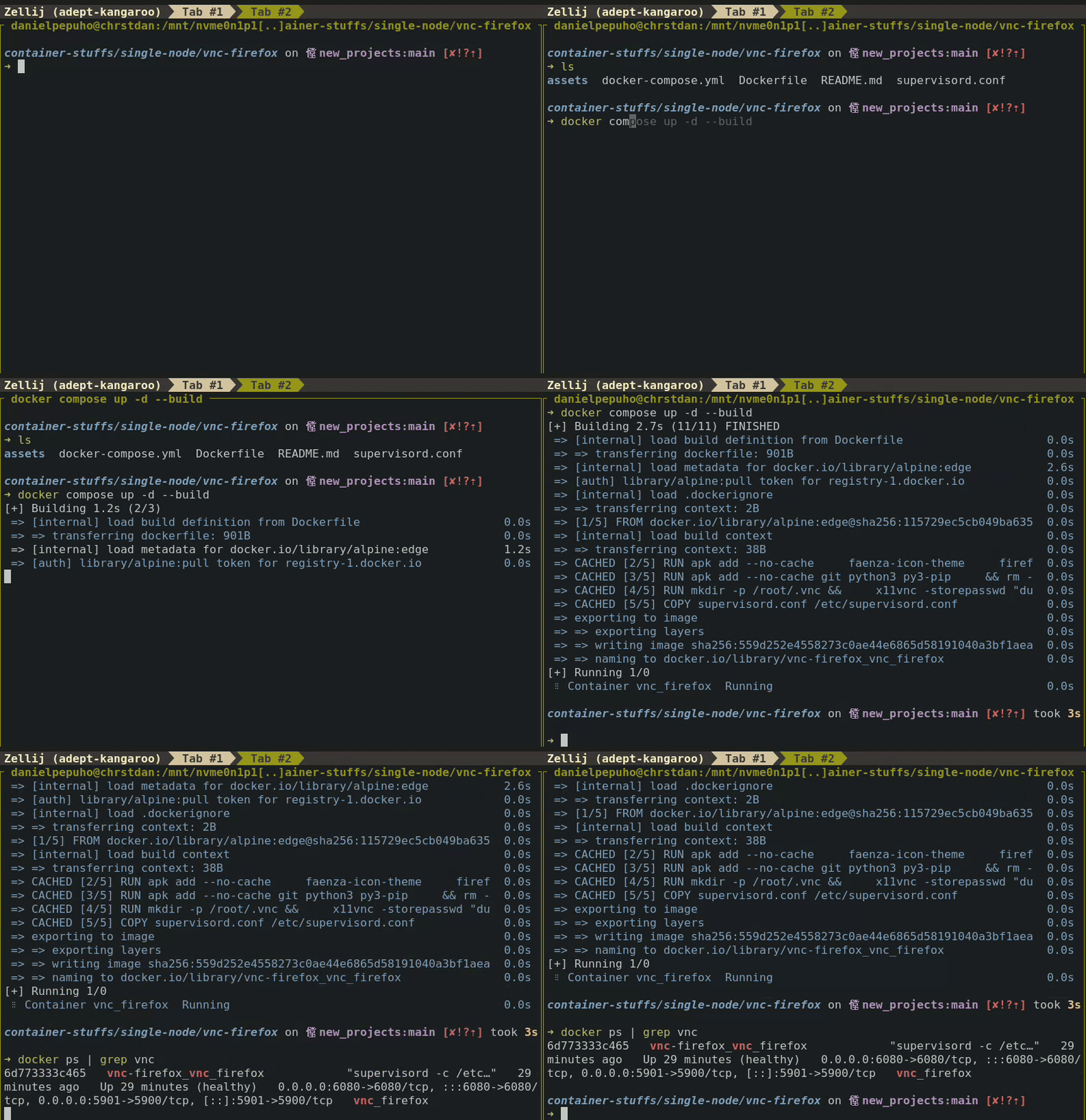
2 Access it by using your browser or VNC client. Using dummypass as password:
- Using noVNC Web:
http://localhost:6080

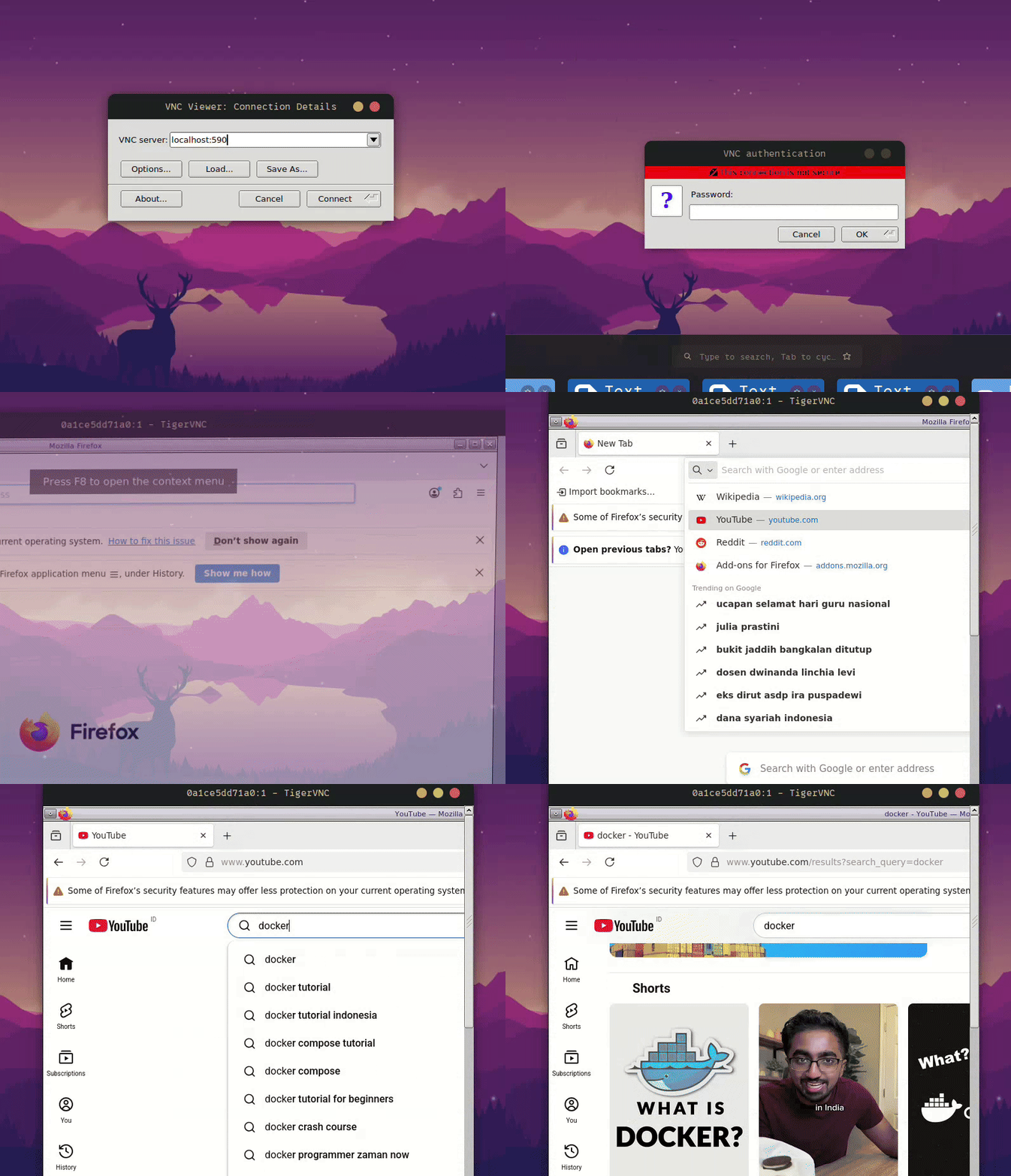
- Open any VNC viewer (e.g., RealVNC, TigerVNC, Remmina), then connect to:
localhost:5901
What’s Next?
Section titled “What’s Next?”While this is mostly a fun experiment, it can be used for:
Headless browser testing environments
Remote browsing (isolated Firefox)
Demonstrating GUI automation setups
Conclusion
Section titled “Conclusion”Docker is more than backend services you can literally containerize entire user experiences.
Projects like this prove that containers aren’t limited to APIs, databases, and background workers. With a bit of creativity, you can run full desktops, interactive UIs, browsers, automation toolchains, and even full development environments inside isolated, reproducible containers.
Running Firefox inside Docker with noVNC shows how:
system-level components (Xvfb, window managers, VNC)
web technologies (WebSockets, noVNC)
and container orchestration (Docker + Compose) can blend together to create something both useful and fun.
Cheers, and happy containerizing! 🐳